




DewesoftX 2026.2 Release - New Data Merger, Custom Widgets, and EIS Analyzer
April 22, 2026
We are excited to release DewesoftX 2026.2, designed to make your setup and analysis faster and more intuitive. This version introduces the Data Merger, allowing you to seamlessly stitch or compare multiple files. The Clean-Up Recorder Marker helps you remove signal disturbances, and Widget Templates allow you to completely customize your displays. We’ve also enhanced the Campbell Plot with multi-channel support and clearer visualization for rotational machinery testing. In the Power sector we have introduced a new Power Module UI and calculations and completely new EIS Plugin.
TL;DR
Data file merger
In Post-Analysis, you often need more freedom: to compare repetitive measurements, stitch data into a single file, or simply remove unwanted gaps. With the new Data File Merger, all of this is now possible.
In the Analysis toolbar, you will find a new button for merging *.dxd data files - or simply select files and right-click to select your operation.
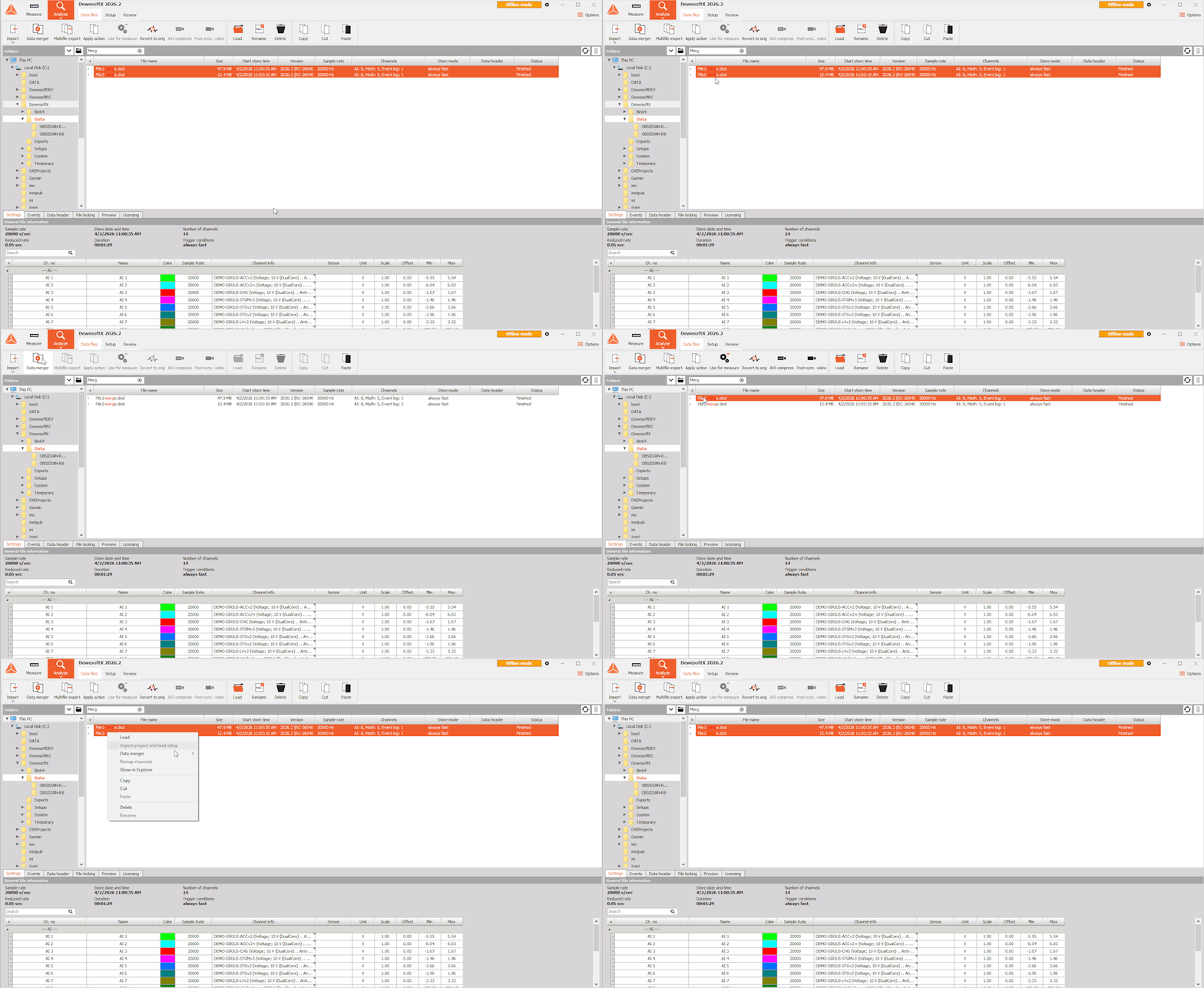
You can choose from three merge operations, each accompanied by an illustration so you can immediately see what the resulting file will look like. When you want to compare multiple data runs, merge the files in parallel. When working with a single file, you can also remove data gaps for a clearer overview.
For parallel and sequential merging, you can choose between union, where all data is merged, and intersection, where only the overlapping data is used. Files can be aligned using absolute time, relative time, or the first trigger (the beginning of the signal) and you can add a custom offset, either for all files or for each file individually.
For all three operations, you can choose which channels will be included in the new data file. DewesoftX will automatically generate a display for the merged file, and you can also add or import displays just as you would for any other file.
Clean-up recorder marker
Real-world signals are rarely perfect—unexpected spikes, disturbances, or irrelevant segments can make analysis harder than it should be. The new Clean-up Marker, available for time-domain data in the Recorder widget, helps you refine captured data and prepare it for more accurate analysis.
You can remove unwanted parts of the signal (such as spikes), with the cut-out sections automatically replaced by linearly interpolated values to maintain a smooth signal. Alternatively, you can completely remove these parts and stitch together only the meaningful segments of your data into a new continuous channel.
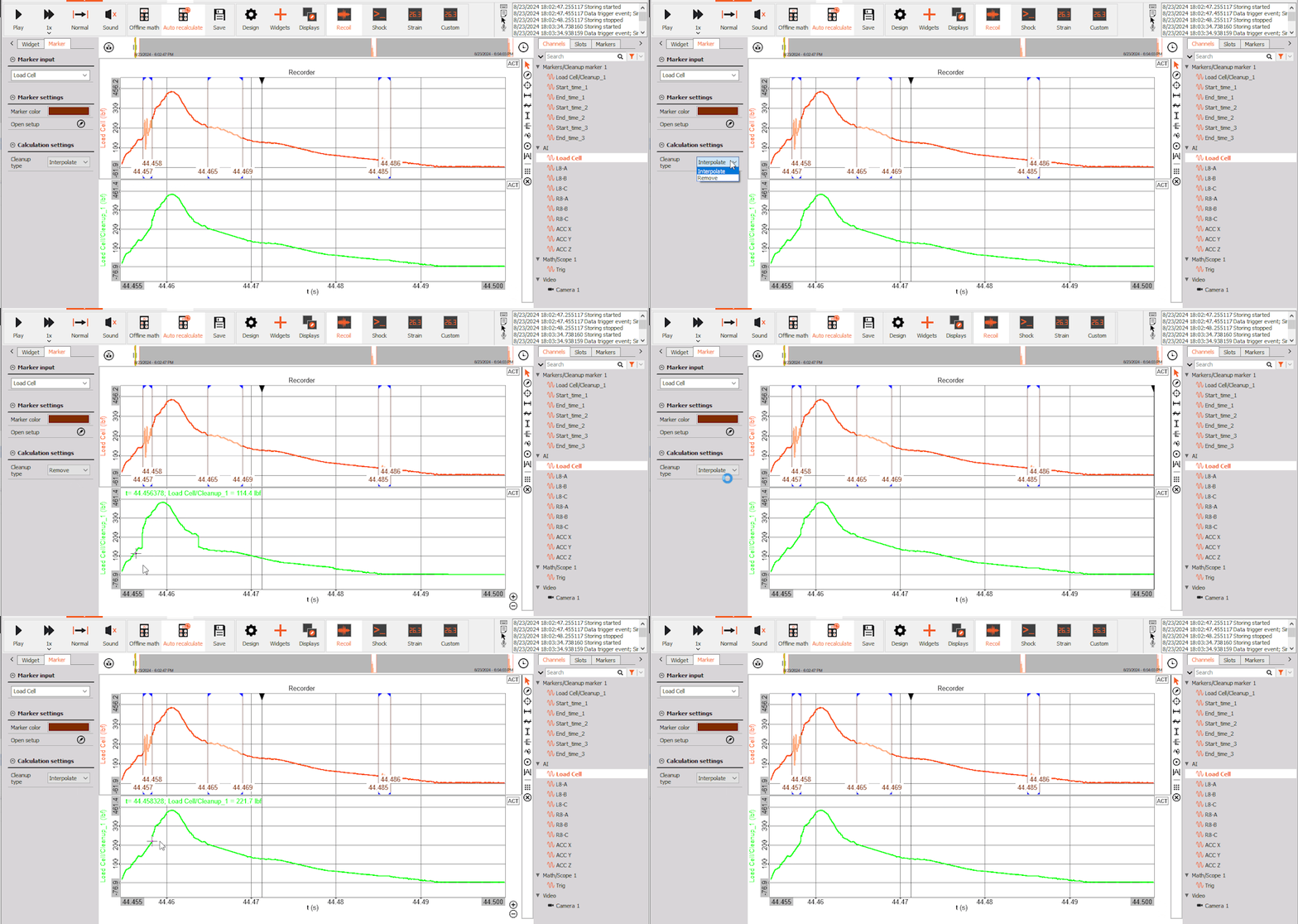
In both cases, a new channel is created while the raw data remains fully preserved in the original measurement file. To select multiple regions within a single marker, hold the SHIFT key while selecting additional regions.
For example, in vibration analysis, removing transient spikes allows you to focus on steady operation, resulting in clearer insights and more reliable results.
Widget templates
If you have always wanted to make custom Dewesoft widgets, now is the time to let your creativity shine! You can now combine widgets into widget templates which you can add to any display, right from the Widgets menu. You can also reuse previously created widget templates as a starting point to create new ones.
Customize the name, description, icon, as well as the widget group they will appear in and access them just like you would any other widget, even if you change setups.You can move, resize, and assign channels to a widget template just as you would a single widget, while still being able to individually customize properties such as color and data type of each widget within it.
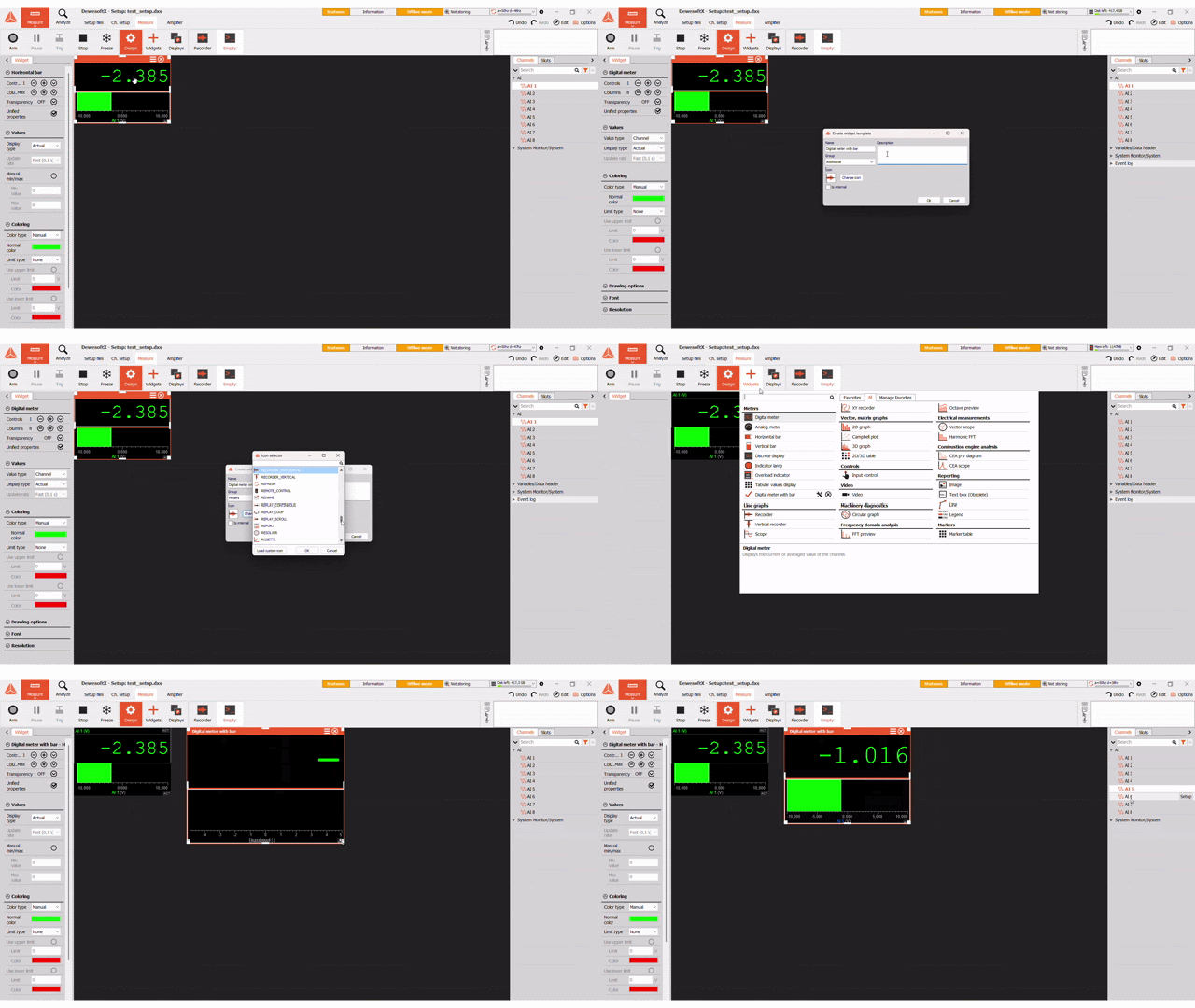
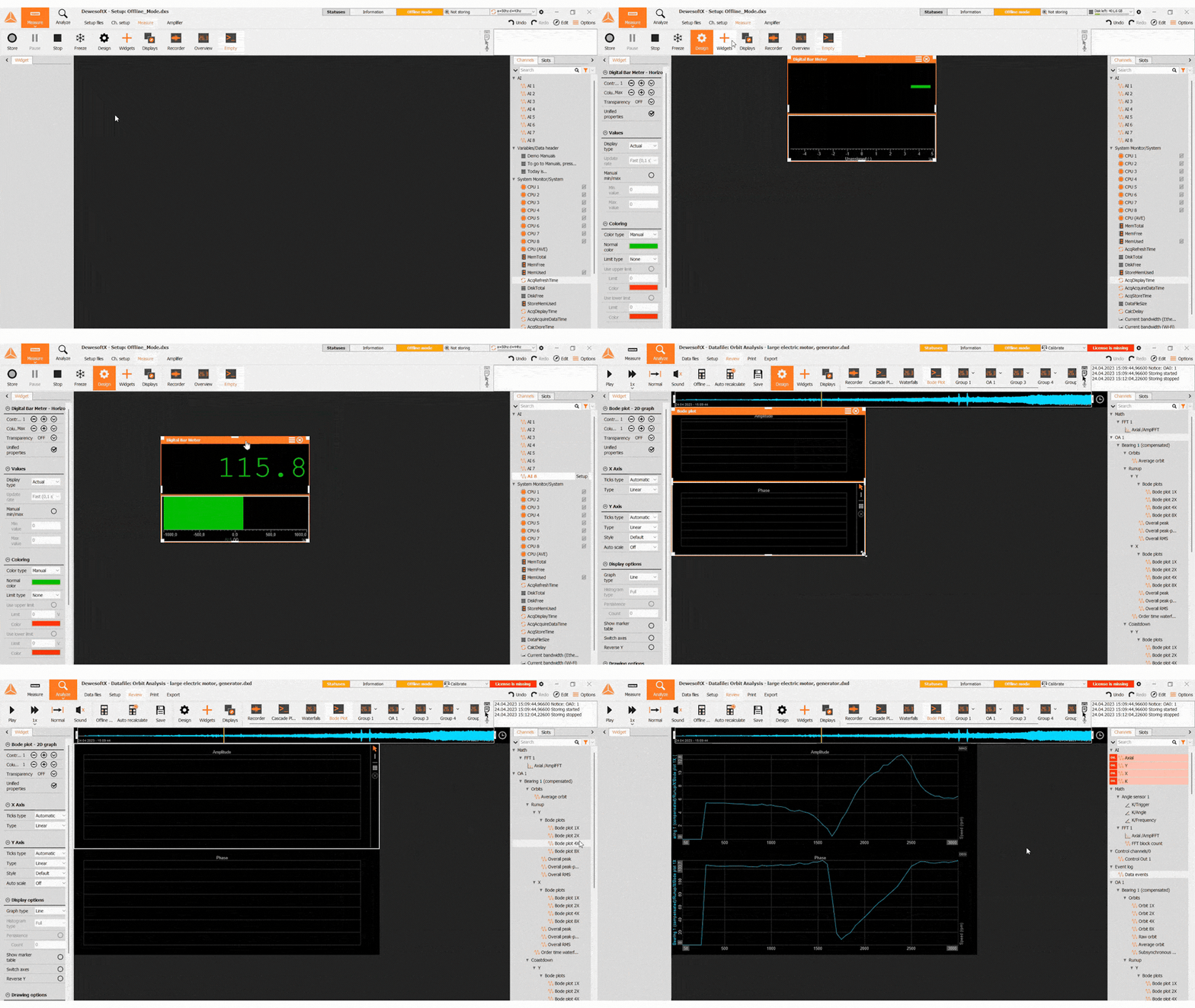
In this release, we introduced two new widgets—Bode Plot and Digital Bar Meter—built using widget templates, demonstrating how powerful and useful this functionality can be.
Campbell plot improvements
The redesigned Campbell plot makes analysis easier and improves data visualization, especially for rotational machinery testing.
Users can now assign multiple channels to the widget, with each channel shown in a different color for better clarity. Data can be displayed using new cross-shaped markers, where the vertical size reflects the signal amplitude. The minimum and maximum size of these markers can be adjusted. Users can also define cut-off values using absolute units for more precise control. These values are displayed on the updated Y-axis with a triangle marker. When viewing a single channel, a color gradient (for example, blue to red) can still be used to represent increasing amplitude.

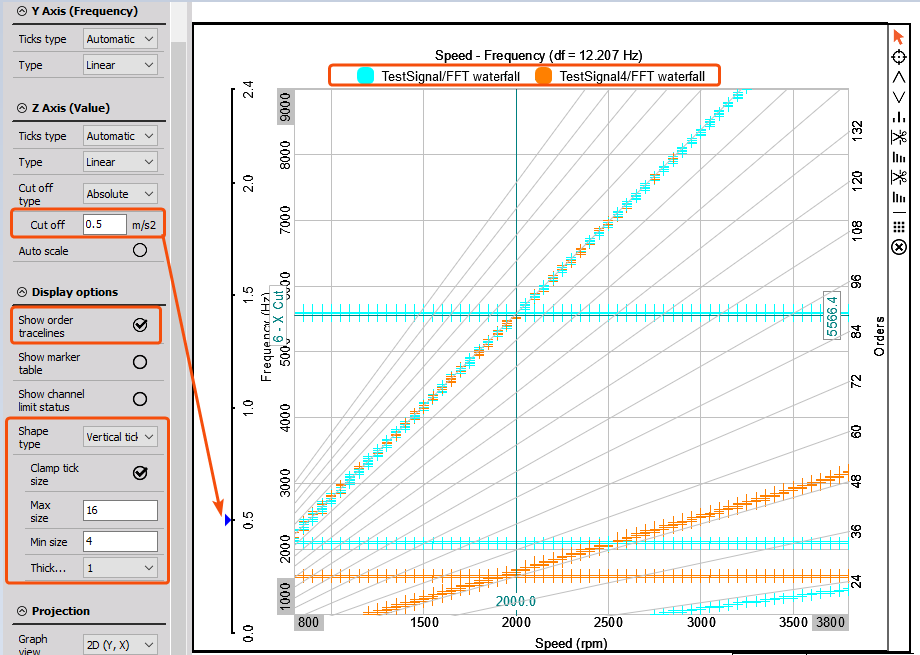
A new order traceline grid makes order tracking easier. In addition, a label at the top shows which color corresponds to each channel, improving readability when multiple channels are used. These improvements are part of the advanced triple Campbell plot and are especially useful for demanding applications, such as jet engine testing.
Power module zero-crossing frequency estimation
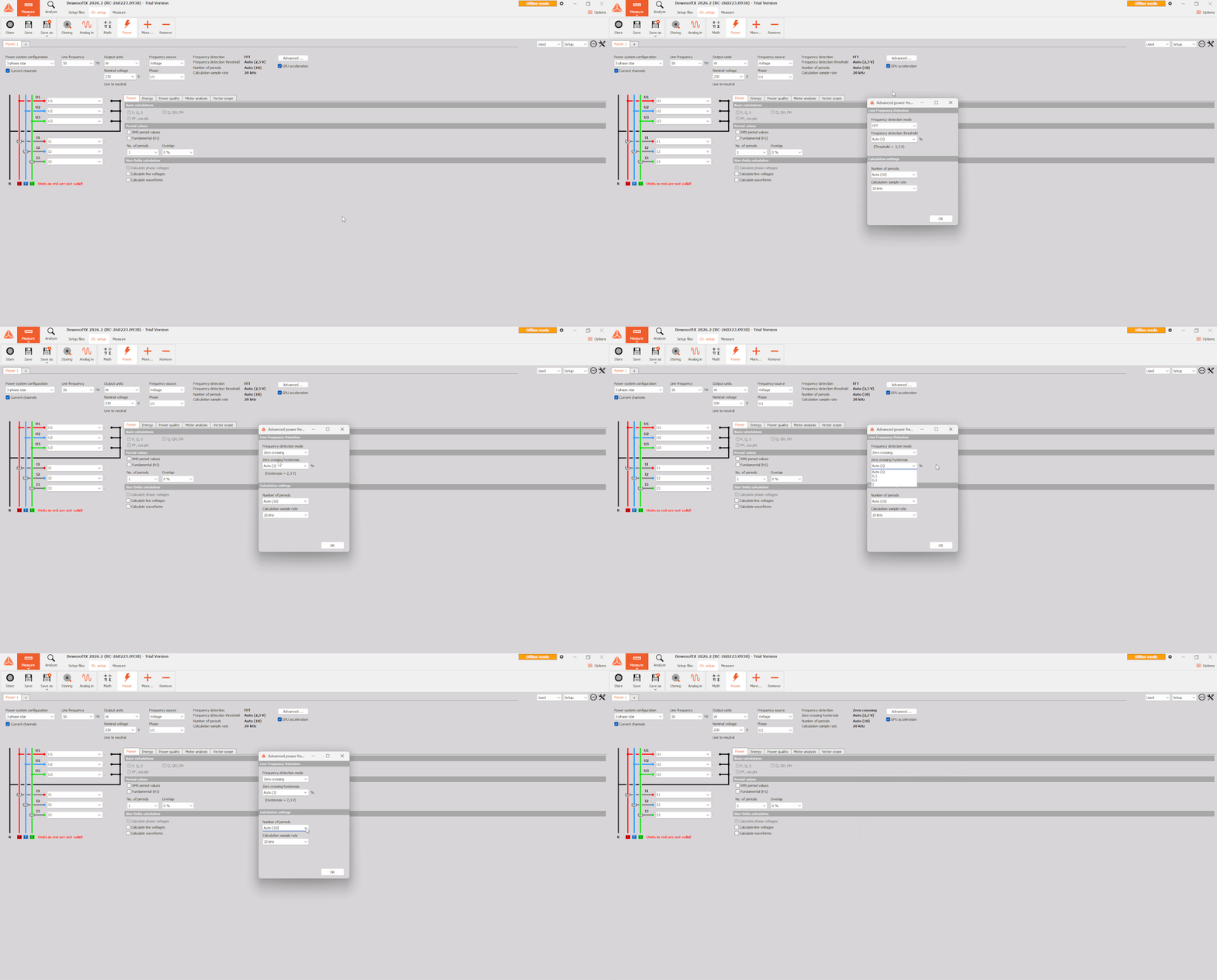
The Power Module has received a refreshed user interface along with advanced frequency detection capabilities. These enhancements give users greater control over how the power module tracks the fundamental frequency. Frequency is a critical parameter that underpins all power calculations. In the new Advanced settings window, users can now select between two frequency estimation algorithms:
FFT based estimation: The method that was the only option until now. It analyses the frequency spectrum and is very well suited for noisy but slower changing signals.
Zero-crossing based estimation: Ideal for applications requiring a very fast response. This method now includes adjustable hysteresis, which filters out spurious zero crossings caused by noise or harmonics.
These improvements provide more robust frequency estimation across a wider range of measurement scenarios. From clean utility power to challenging drivetrain systems.
Electrochemical impedance spectroscopy (EIS) analyzer
Battery testing has evolved far beyond simple charge and discharge cycles. Today, the focus is on understanding the underlying electrochemical processes, identifying degradation mechanisms, and extracting deeper insights into performance and health. All of this is now possible with the EIS analyzer.
By applying a frequency sweep and measuring the resulting voltage and current response, the EIS analyzer delivers all the key results you would expect from conventional EIS analyzers.
The module can be fully configured to match your needs, from frequency detection and visualization to output channel selection, giving you complete flexibility in your setup. Predefined displays provide all the essential information at a glance, enabling a fast and intuitive overview of the calculations.
And with the Nyquist plot, you gain immediate visual insight into the battery’s impedance, making it easier to interpret complex electrochemical behavior.


Support of new hardware devices
With the Dewesoft X 2026.2 release, we are expanding hardware support with a range of new high-performance devices and modules:
SIRIUS® XR Systems
SIRIUS® XR9 system
SIRIUS® XR5 system
SIRIUS-XR-SBOX
SIRIUS® X / XHS Modules and Slices
SIRIUSir-XHS rack slices
SIRIUSr X rack slices
SIRIUS XHS-CHG amplifier
SIRIUS XHS counters with variable trigger support
X-Line Modules
IOLITEi-X-4xUNI and SIRIUSi-X-8xUNI fully isolated universal modules
IOLITEi-X-4xCAN-FD and SIRIUSi-X-8xCAN-FD multichannel CAN-FD modules
IOLITE Modules
IOLITEir-8xRTD v3 fully isolated module for temperature (RTD, thermistors), resistance, and voltage measurements
This release further strengthens Dewesoft’s ecosystem with enhanced flexibility, expanded connectivity, and support for the latest generation of data acquisition hardware.
What else is new?
You will find additional details about all features listed below on Dewesoft’s Engineering Support Portal:
Export CAN and CAN FD channels in MDF format
Flexibly adjust the y-axis position on the 2D graph widget
Improve visualization with channel-based coloring in the Bar widget
filtered orbits e.g. 1X now contain info about the shaft center position.
harmonic compensation table values are now illustrated based on the set Amplitude format.
Dip&Swell events according to IEC 61000-4-30
Aircraft Power predefined displays and reference curves
DewesoftX 2026.2 is a free upgrade for all Dewesoft customers and is compatible with all Dewesoft data acquisition systems. Please download the upgrade from our download center, where you will also find a changelog listing all the minor improvements and bug fixes.