Remote Heart Rate Monitoring with Bluetooth Sensors in DewesoftX
Žiga Remic
University of Ljubljana
November 27, 2026
Heart rate monitoring can provide valuable insight into human response, workload, and physical activity in applications ranging from sports and rehabilitation to vehicle testing and ergonomics. I present a practical method for integrating Bluetooth Low Energy heart rate sensors with DewesoftX via real-time UDP communication and the Ethernet Receiver extension. The developed solution enables flexible, low-cost, and remote acquisition of physiological data alongside other synchronized measurement channels such as GPS.
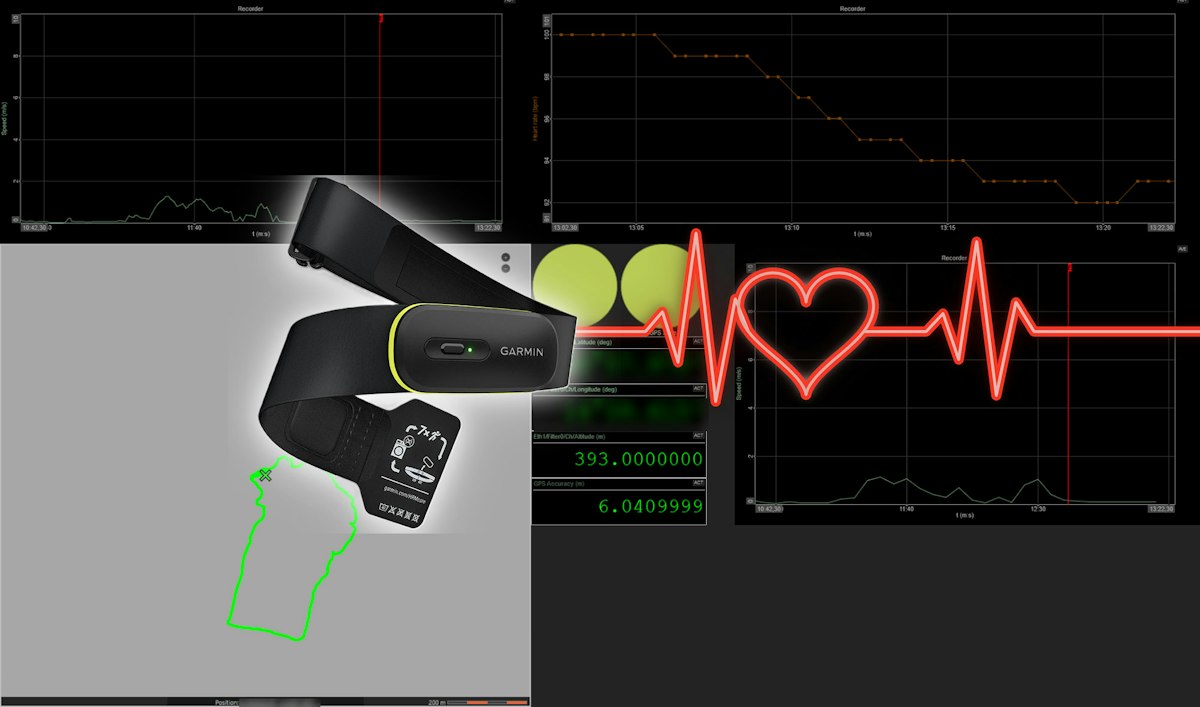
Heart rate is an important indicator of a person’s physical condition and can be useful to measure in various situations. It is most commonly associated with sports and medical applications. Still, it can also provide valuable insights when testing the user experience of new technologies or evaluating people's workload in specific environments.
For example, heart rate could be monitored among passengers in a self-driving vehicle or among amusement park visitors riding a roller coaster. In vehicle prototypes, it could be used to observe test users' responses upon first interacting with a new control system. On a production line, heart rate data could help identify when workers are under the highest load and how their tasks or working environment could be optimized. In rehabilitation after injuries, measurements of physical effort during different movements can also provide useful information.
Objectives of wireless heart rate monitoring
In many of these situations, a Dewesoft system may already be used to acquire other physical quantities. Extending such a setup with heart rate measurement can therefore provide additional insight into the human response during a test.
Traditionally, heart rate is often measured using electrodes connected directly to a measurement device. However, this approach can significantly restrict the subject's movement, and the electrodes must be placed correctly at specific points on the body by a trained person.
For this reason, my objective is to develop a more practical and flexible method for acquiring heart rate data in DewesoftX: A method for wirelessly connecting accessible and cost-effective heart rate sensors to DewesoftX. The solution should enable reliable real-time data acquisition and integrate heart rate data with other measured quantities.
Types of heart rate sensors: ECG and PPG
Heart rate can be measured using two main types of sensors: electrocardiography-based and photoplethysmography-based. [1]
Electrocardiography (ECG) sensors
Electrocardiography (ECG) is a method for detecting the weak electrical signals generated by the heart during its contraction and relaxation cycles. The electrical potential differences produced by cardiac activity are measured as voltage differences between a pair of electrodes. In non-invasive applications, these electrodes are usually conductive pads placed on the body's surface.
Different types of ECG electrodes exist, including wet, dry, and capacitive electrodes. Wet electrodes are most commonly used in medical electrocardiography because they provide high-quality measurements. However, they are less suitable for long-term or highly mobile measurements, since the conductive gel can dry out over time, the skin often requires preparation, and irritation may occur during prolonged use. Dry and capacitive electrodes are therefore often used in wearable or consumer applications where comfort and practicality are more important.


Photoplethysmography (PPG) sensors
Photoplethysmography (PPG) is an optical technique that detects changes in blood volume in the skin. A typical PPG sensor consists of a light-emitting diode (LED) and a photodetector. The LED emits light into the skin, and the photodetector measures the light reflected from or transmitted through the tissue. During each heartbeat, arterial blood volume changes, which in turn alter the amount of light absorbed by the tissue.
Based on this optical signal, the device can estimate heart rate. Because PPG sensors are relatively simple, compact, and inexpensive, they are widely used in wearable devices such as smartwatches, wristbands, and finger sensors.


Both ECG and PPG sensors are available in devices of different sizes and with different communication interfaces. In this application note, the focus is on wireless, battery-powered heart rate monitors, since they are the most flexible option for measurements in different environments. Many modern consumer heart rate sensors transmit data using Bluetooth Low Energy (BLE). In particular, the standardized Bluetooth Heart Rate Service defines how heart rate data can be exposed by a sensor and read by a receiving device, which makes it suitable for integration into custom measurement systems [5].
For this reason, BLE heart rate sensors are a practical starting point for integrating heart rate data into DewesoftX. The sensor can remain physically independent of the Dewesoft measurement hardware while still acquiring data in real time.
Integrating Bluetooth heart rate sensors into DewesoftX
The goal of the implementation is to create a reliable data bridge between a wireless heart rate sensor and DewesoftX. Since the selected sensor transmits heart rate data over Bluetooth Low Energy, while DewesoftX receives external data through supported communication interfaces, an intermediate application was required. This application receives the heart rate data from the sensor, converts it into a defined data format, and forwards it to DewesoftX in real time.
Several DewesoftX extensions could be used for this purpose:
Ethernet Receiver: This approach requires only a simple application that sends heart rate data to the computer over UDP. It is easy to implement, has low latency, and does not require a complex communication protocol. However, it does not provide built-in mechanisms for data validation, error correction, or security.
Modbus TCP Client: In this case, a Modbus TCP server would have to be implemented. The heart rate value would be exposed as a Modbus register, which DewesoftX could then read as a Modbus client. This approach is more standardized and robust, but it requires additional communication logic and periodic data polling, which increases system complexity.
OPC UA Client: This approach would require an OPC UA server that exposes the heart rate data as variables, which DewesoftX could access as an OPC UA client. OPC UA is standardized and scalable, but it is significantly more complex to implement for this type of simple real-time data stream.
Due to its simplicity and low latency, the Ethernet Receiver extension was selected for this application note.
Connecting a Bluetooth heart rate sensor using Python
The simplest way to acquire heart rate data in DewesoftX via the Ethernet Receiver is to connect the Bluetooth sensor directly to the same computer running DewesoftX. For this demonstration, a Python program was created that connects to the sensor. In this case, the sensor was a Garmin Forerunner 265S smartwatch, which supports heart rate broadcasting over Bluetooth Low Energy.
The Python program subscribes to the standard Bluetooth Heart Rate Measurement characteristic and receives live heart rate values from the watch. Each received value is then converted into a 32-bit floating-point number and sent over UDP to port 5005 on the computer. DewesoftX receives this UDP stream via the Ethernet Receiver extension and interprets the value as a heart-rate channel.
This approach is simple and useful for initial testing. However, it also has an important limitation: the sensor must remain within Bluetooth range of the computer. In practice, this limits the measurement distance to only a few tens of meters.


Remote heart rate and GPS data acquisition
To monitor heart rate over longer distances, the communication between the sensor and the computer cannot rely only on Bluetooth. Instead, the Bluetooth sensor must be connected to a device that can forward the data over a longer-range network. A practical solution is to use a mobile network, since it provides wide coverage and relatively low operating cost.
In this setup, the heart rate sensor is connected to a mobile device, which then forwards the data over the internet to the computer running DewesoftX. However, directly accessing the DewesoftX computer from the internet is not ideal. One possible solution would be to expose the UDP ports used by DewesoftX to the public internet, but this is not recommended.
Since the UDP stream lacks authentication, any external device could send data to those ports, potentially corrupting the measurement. A better solution is to use a VPN connection to the DewesoftX computer's local network. This makes the mobile device appear to be connected to the same local network as the measurement computer, without exposing the computer’s ports directly to the internet.
This concept was implemented using an Android smartphone. A custom Android application was developed to connect to the heart rate sensor via Bluetooth Low Energy and forward the received data to the DewesoftX computer over UDP. In addition to heart rate transmission on port 5005, the application also acquires the phone’s GPS position and sends it to port 5006 as a separate UDP stream.
When the user presses the “Start” button in the Android application, the phone connects to the heart rate sensor and enables notifications on the Bluetooth Heart Rate Measurement characteristic. From that point on, each heart rate value is sent to the DewesoftX computer at IP address 192.168.1.1 on port 5005. At the same time, the application starts acquiring GPS data from the phone.
If the reported location accuracy is better than 20 m, the application sends the current position to port 5006. The heart rate and GPS data are transmitted independently. Heart rate is sent whenever a new heart rate notification is received from the sensor, while GPS data is sent whenever the phone provides a new location update. This makes the system suitable for mobile measurements, where both the subject's physiological response and their location are relevant.


Field testing and heart rate measurement results
To test the complete system in a practical scenario, a short outdoor run was conducted. The Android application was started on the phone, heart rate and GPS streaming were enabled, and DewesoftX was used to record the incoming data streams. During the test, the phone received heart rate data from the Bluetooth Low Energy heart rate sensor and acquired GPS data from its internal location service. Both data streams were then transmitted to the DewesoftX computer through the VPN connection.
In DewesoftX, the heart rate signal was displayed as a channel, while the GPS data was decoded into channels for latitude, longitude, altitude, accuracy, and speed. After the measurement, the recorded heart rate channel was exported and plotted. The graph shows the heart rate during the running activity, increasing during the active part of the test and decreasing at the end. This indicates that the data path from the wearable sensor, through the Android application and VPN connection, to DewesoftX worked as intended.


The Android application displayed the current heart rate and GPS data during the test, while DewesoftX recorded the received channels and displayed the movement path on the map widget.
Conclusion: benefits and limitations of wireless heart rate monitoring
The implemented solution proved to be a simple and effective way of acquiring heart rate data in DewesoftX in real time. Using a wireless Bluetooth Low Energy heart rate sensor and forwarding the data to DewesoftX over UDP, the system enables integration of physiological data into an existing measurement setup without physically connecting the subject to the measurement hardware.
The solution is compatible with sensors that use the standard Bluetooth Heart Rate Service, which makes it suitable for a wide range of consumer heart rate monitors and wearable devices. In the final implementation, the Android application also transmitted GPS data from the phone, allowing heart rate and location data to be recorded together in DewesoftX. This makes the system especially useful for mobile measurements, field tests, and applications where the subject must move freely.
The main advantages of the presented approach are its simplicity, low cost, wireless operation, and flexibility. The use of the DewesoftX Ethernet Receiver extension made the integration straightforward, while the VPN connection allowed remote measurements without exposing the receiving UDP ports directly to the public internet.
However, the system also has limitations. The UDP data streams used in this implementation do not include built-in encryption, authentication, or packet verification. If the system were used outside a controlled network, additional security mechanisms would be required to prevent unauthorized or incorrect data from being injected into the measurement. Using a VPN reduces this risk, but the data format itself remains simple and unprotected.
Several improvements are possible. The UDP packets could include timestamps, sequence numbers, or checksums to improve synchronization and reliability. The Android application could also be extended to allow remote start and stop of streaming from the computer running DewesoftX. Another possible improvement would be to replace the smartphone with a smaller dedicated gateway device, which would be less intrusive for the user. For local measurements, a custom DewesoftX plugin could also be developed to read Bluetooth heart rate data directly.
Overall, the project demonstrates that accessible wireless heart rate sensors can be successfully integrated into DewesoftX and used together with other measured quantities. This creates a flexible basis for further applications in sports testing, human response analysis, ergonomics, vehicle testing, and other situations where physiological data can add context to technical measurements.
References
Galli, R. J. H. Montree, S. Que, E. Peri, and R. Vullings: “An overview of the sensors for heart rate monitoring used in extramural applications.” Sensors, vol. 22, no. 11, p. 4035, 2022. [Online]. Accessed: Apr. 29, 2026.
Polar Electro: “Polar OH1 optical heart rate sensor.” [Online]. Accessed: Apr. 29, 2026.
Bluetooth SIG: “Heart Rate Service 1.0.” [Online]. Accessed: Apr. 29, 2026.
P. Farkas: “Diagnostics ECG Buyers Guide: 5 best-selling ECG machines.” Tiger Medical, Sep. 29, 2023. [Online]. Accessed: Apr. 29, 2026.
Garmin: “HRM 600.” [Online]. Accessed: Apr. 29, 2026.