




Save Time and Improve Test Results with Sensor Databases and TEDS Sensors

March 23, 2026
In modern data acquisition systems, whether in aerospace, automotive, energy, or industrial testing, quickly and accurately setting up sensors is critical. DewesoftX DAQ software from Dewesoft offers powerful tools that significantly reduce setup time while improving measurement reliability. Its built-in analog and digital sensor databases are at the heart of this efficiency. They work with Transducer Electronic Data Sheet (TEDS) technology to automate and safeguard the sensor configuration process. TEDS is a standard based on IEEE 1451 that reads information about sensors connected to a signal conditioner. It’s an interface for sensors and actuators.
This article examines how these features operate and mitigate human error. We also examine why they are crucial for rapid, repeatable measurement setups in demanding test environments.
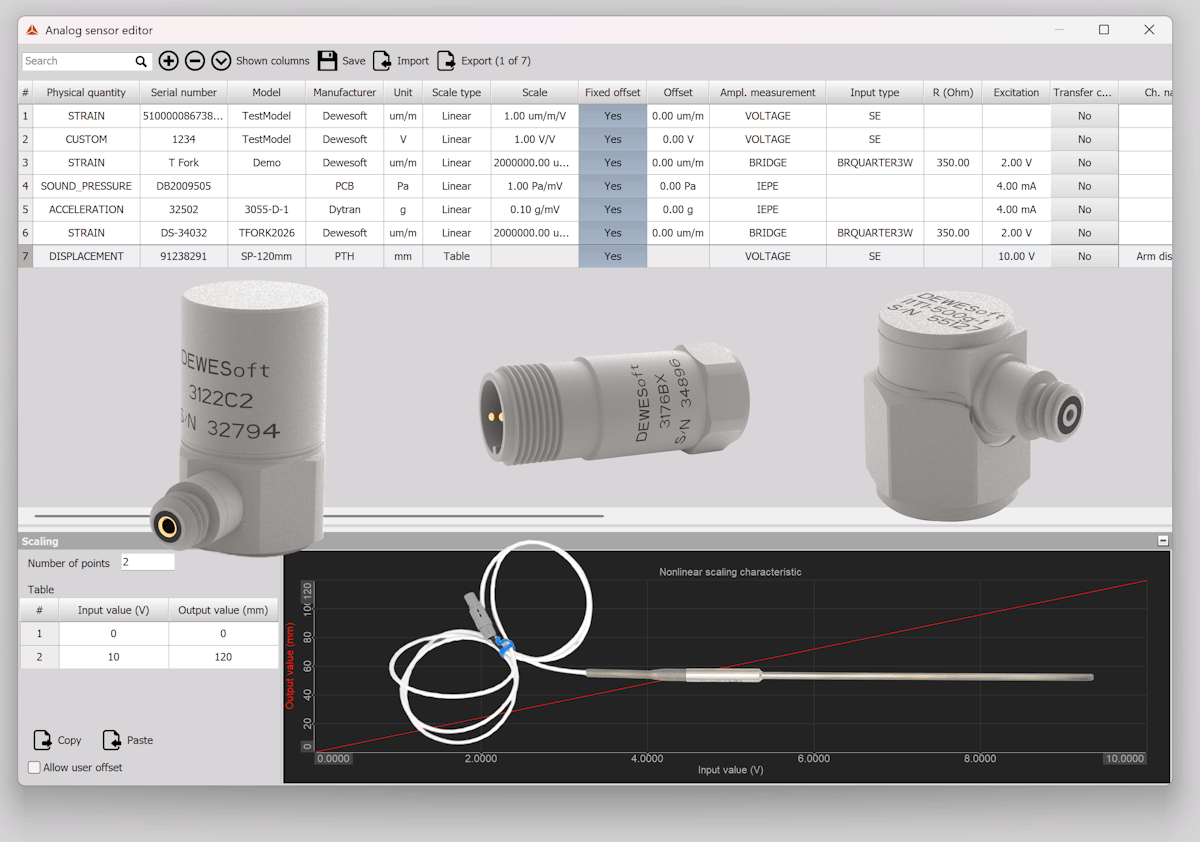
DewesoftX analog and digital sensor databases: an overview
DewesoftX comes with integrated databases for analog and digital sensors. These centralized libraries store configuration data for each sensor, enabling rapid, repeatable test setups without re-entering sensor properties each time.
Analog sensor database
Analog sensors (e.g., accelerometers, strain gauges, and thermocouples) require correct scaling, excitation voltage, bridge type, and other parameters to function accurately. In traditional DAQ systems, these parameters are often manually entered, a time-consuming and error-prone process.


The analog sensor database in DewesoftX addresses this by storing all relevant sensor metadata:
Sensor name and ID
Manufacturer and serial number
Sensor type (e.g., voltage, bridge, thermocouple)
Sensitivity or scaling factors
Measurement units
Excitation voltage
Wiring configuration (e.g., full bridge, half bridge)
You can configure each sensor freely, including selecting its setting type from LINEAR, POLYNOMIAL, or TABLE. The screenshot above shows a displacement sensor scaled using a simple two-point table: 0 V from the sensor corresponds to 0 mm, and 10 V corresponds to 120 mm. Table scaling can be performed across multiple points if needed. With polynomial scaling, you enter or import the desired coefficients.
When users connect a known sensor, they can simply select it from the sensor database. DewesoftX automatically applies the correct configuration, eliminating the need for manual entry and minimizing the risk of misconfiguration.
Digital sensor database
DewesoftX also supports a digital sensor database for digital interfaces such as encoders and tachometers. Similar to the analog database, it stores detailed information about each digital sensor or bus device:
Channel names
Engineering units
Scaling factors
This allows engineers to plug in digital devices and quickly map signals to meaningful engineering units without manually decoding the messages.


Faster test setup: how it works
During test setup, users can select the sensors defined in the analog and digital sensor databases shown above. DewesoftX then automatically configures each channel according to the settings in the databases.


It works the same way when configuring digital sensors, such as encoders and tachometers. Simply go to the counter setup screen. Our instrument is a SIRIUS slice with two SuperCounters, as shown on the screen below:


Click the Setup button on the right side of each counter to open its setup dialog:


Starting at the top-left, select the correct sensor type from the “Basic Application” menu. In this case, we choose “Sensor (encoder, CDM, tacho, etc.).” Then select the sensor type “Encoder,” then the specific sensor from your database below that. There is a square button with three dots that opens the digital sensor database again for your convenience. If you want to make any changes to it, you can do so here to save time.
Because encoders typically have numerous outputs, you can toggle any or all of them between “Used” and “Unused” according to your test requirements.
Cross-system compatibility
Sensor databases can be shared between and among Dewesoft systems, making multi-site or multi-team setups more consistent and efficient.
Error reduction through consistency
One of the most essential benefits of DewesoftX’s sensor databases is consistency. Reusing validated sensor configurations significantly reduces the likelihood of human error, especially in high-channel-count applications or mission-critical tests such as aerospace vibration or automotive crash testing.
Some key error-mitigation features include:
Calibration integrity: DewesoftX helps validate the sensor scaling by storing the last-known calibration data.
Automatic unit matching: The software enforces unit compatibility between the sensor and DAQ channel, helping prevent nonsensical configurations.
Configuration locking: Sensors can be locked to specific channels, which is essential in regulated testing environments.
TEDS technology: automatic sensor recognition
While sensor databases significantly improve speed and accuracy, DewesoftX takes it a step further by supporting TEDS, a smart transducer interface standard.
TEDS is an IEEE 1451.4 standard that enables smart sensors to carry sensor information in a tiny chip installed either inside the sensor itself or within the connector.
There are numerous tests that involve dozens or even hundreds of sensors. It is extremely time-consuming to set up each channel individually. In addition, long, tedious jobs can lead to fatigue, which can result in human errors. TEDS automates sensor assignment to each input and even sets the preamplifiers to match the information contained inside each sensor. The time savings and prevention of human error are truly significant. Dewesoft systems provide robust TEDS compatibility.
When you connect a TEDS sensor to a channel, the TEDS data is read automatically, and the channel is set up for you, saving even more time and preventing errors. If a TEDS sensor is detected, the channel setup screen will show a TEDS button as shown in the top-right quadrant of the screenshot below:


When you click the TEDS tab, several sub-screens of information appear below, starting with the Header and then the various templates.


TEDS chips contain key information such as:
Sensor type and manufacturer.
Sensor serial number.
Calibration date and due date.
Calibration values (e.g., sensitivity).
Measurement unit (e.g., Newtons, A, Hz, V, m/s2).
Wiring and connection data.
Plug-and-measure with TEDS
When a TEDS-enabled sensor is connected to a compatible Dewesoft DAQ system, DewesoftX software reads the TEDS chip and automatically configures the DAQ channel with:
Correct signal scaling
Calibration factor
Sensor label and metadata
Measurement units
This dramatically reduces setup time and nearly eliminates configuration errors for users managing dozens or hundreds of sensors, such as in aerospace structural testing or rotating machinery diagnostics. TEDS can save hours of labor while improving data traceability and preventing human errors.
Dewesoft’s sensor database and TEDS support work hand-in-hand to save time and reduce setup errors by streamlining DAQ test setup.
Real-world applications
Structural testing
Engineers often deploy hundreds of strain gauges and accelerometers during structural strain tests on large structures such as aircraft wings and fuselages, wind turbines, buildings, bridges, cars, trucks, and more. Preloaded sensor databases ensure each sensor is correctly assigned, and TEDS support enables rapid deployment of smart sensors, particularly beneficial during aircraft test campaigns under time pressure.
Durability testing
DewesoftX is widely used in road load data acquisition (RLDA) and NVH testing. By utilizing the sensor database to apply consistent accelerometer or pressure sensor settings across multiple vehicles, test teams can ensure apples-to-apples comparisons across fleets or model variants.
Power and energy
Encoders and tachometers are essential in testing turbines of all kinds, from hydro dams to wind turbines. DewesoftX's digital sensor database ensures consistent mapping and scaling across deployments, reducing setup complexity in generating and substations.
Exporting and sharing sensor databases
DewesoftX enables users to export and import sensor databases between systems, ensuring enterprise-wide consistency. This means a central test lab can define sensors, and field teams can implement the same definitions without error. It’s also essential for version control in ISO 17025 or AS9100-certified labs, where sensor traceability is mandatory.
Conclusion: smarter, faster, more reliable DAQ setups


Combining DewesoftX’s analog and digital sensor databases with TEDS smart sensor technology transforms how engineers approach setting up the DAQ system. These tools significantly enhance productivity and data integrity by minimizing manual configuration, ensuring consistency, and facilitating seamless plug-and-play hardware integration.
For organizations that require a fast turnaround and reliable, repeatable measurements, such as those in the aerospace, automotive, civil engineering, and energy sectors, DewesoftX offers a robust, scalable solution for managing complex sensor configurations.
Frequently asked questions
What is a sensor database, and why use one in test and measurement?
A sensor database centralizes sensor metadata (type, model number, manufacturer name, serial number, sensitivity, scaling, calibration data, engineering units, wiring, and more), improves consistency across teams, and enables faster, error-free setup.What information is stored in a sensor database?
Typical parameters include the sensor manufacturer name and model number, sensor name, measurement range, sensitivity, engineering units, scale type (linear, table, polynomial), input type (differential, single-ended), last calibration date, next calibration due date, and more.What are TEDS sensors?
TEDS-enabled sensors contain a small chip, either within the sensor or in the connector, that stores the important sensor data mentioned above. This data can be read by TEDS-compatible signal conditioners and DAQ systems, including those made by Dewesoft.What is the difference between a sensor database and TEDS sensors?
The sensor database is the central repository for information on all sensors, both TEDS and non-TEDS. TEDS sensors contain a chip that stores programmable information about the sensor, which can be synchronized with the sensor database.Do I still need a sensor database if I use TEDS sensors?
Yes, because not all sensors are TEDS compatible. A sensor database enables engineers to share sensor data across multiple DAQ systems, maintain sensor naming conventions, ensure traceability, and manage sensor calibration and lifecycle information.Can a sensor database work with non-TEDS sensors?
Yes. Engineers are free to enter sensors into the database manually and maintain their data there. This access can be password-protected to ensure data integrity.How does a sensor database reduce setup errors?
Imagine setting up a test with dozens or even hundreds of accelerometers: automatic sensor detection, identification, and setup save time and prevent manual entry errors.What are the common pitfalls of TEDS sensors?
Examples: outdated TEDS vs recent calibration, inconsistent engineering units, duplicated sensor IDs, and assumptions about accuracy.How should we handle calibration with a sensor database and TEDS sensors?
Clarify that calibration records and “latest known good” factors typically live in the database, even if TEDS contains baseline values.Is TEDS supported on all sensor types and interfaces?
Because TEDS imposes a small cost per sensor, relatively inexpensive analog sensors like thermistors and thermocouples rarely include it. However, it is possible to add TEDS capability to virtually every sensor by adding a TEDS chip inside the sensor’s connector and programming it. The DewesoftX manual describes this workflow and references a commonly used chip type.How do I migrate from spreadsheets to a sensor database?
Certain sensor databases, such as the one included in DewesoftX software, allow easy import of sensor data from external sources.How do I enable TEDS in DewesoftX?
Go to the DewesoftX settings screen and enable the DSI adapters and TEDS sensors option. This allows the software to scan and read TEDS information when compatible hardware is used.What happens in DewesoftX when I connect a TEDS sensor?
When TEDS is enabled, DewesoftX can read sensor information from the TEDS chip and automatically apply relevant channel settings, reducing manual entry and speeding up setup.Can I rescan a sensor’s TEDS data without rebuilding my setup?
Yes. DewesoftX includes channel actions for rescanning DSI/TEDS and for pausing or resuming the TEDS scan, which helps when you swap sensors or update sensor information.Can I stop DewesoftX from reading TEDS from certain devices?
Yes. DewesoftX includes an advanced option to disable reading of external TEDS on DSI adapters in cases where, for example, a DSI ACC can read TEDS from the accelerometer, but you want to prevent it from doing so, for whatever reason.Does DewesoftX support both TEDS and a sensor database?
Yes. Dewesoft documentation and training materials cover the use of TEDS sensors alongside Dewesoft’s sensor database, so you can manage sensor data centrally and simplify setup across projects and teams.What are Dewesoft DSI adapters, and how do they relate to TEDS?
Dewesoft Smart Interfaces (DSI) are adapters that allow various Dewesoft signal conditioners to directly handle various sensors. There are DSI adapters for direct connection of current, charge accelerometers, IEPE accelerometers, LVDTs, 200 V signals, and more. DSI adapters include a built-in IEEE 1451.4 TEDS chip and are designed to enable plug-and-play style setup. For example, when you plug a DSI-ACC (IEPE) adapter into a compatible Dewesoft signal conditioner (assuming that TEDS is enabled under system settings), the DSI adapter will be identified automatically, and the channel will be configured as an IEPE input.Which Dewesoft hardware families can use DSI adapters for TEDS workflows?
The DSI adapter manual states they fit Dewesoft systems that provide DSUB-9 analog inputs, and it explicitly lists multiple product families, including SIRIUS, KRYPTON, IOLITE, OBSIDIAN, and DEWE-43A.Are TEDS settings always identical to the “latest calibration”?
Not necessarily. TEDS may store identification and calibration-related factors, but many teams still rely on a sensor database to manage the authoritative, most recent calibration records, due dates, documentation, and organization-wide naming conventions. This is one reason Dewesoft trains TEDS and sensor database usage together.How do we update the system when a sensor is recalibrated?
DewesoftX and its sensor database make it easy to update sensor calibration data. For non-TEDS sensors, this can be done directly in the sensor database. For TEDS sensors, the Dewesoft TEDS Editor utility allows new data to be written into the sensor’s TEDS chip. This data is then synchronized with the sensor database.
Want to learn more?
Visit DewesoftX Software Overview to explore additional features or contact Dewesoft for a personalized demo. You can also download the software for free and test it yourself.
For more details about using TEDS and the DewesoftX sensor database, please check out this free online course.